ESP32 KiCad library: what KiCad already has, what Espressif adds, and what to check
Before you download an ESP32 library from a random GitHub repository, look in KiCad itself: its own libraries already carry the common ESP32 modules with symbols, footprints and the antenna keep-out. For the newer chips and Espressif’s development boards, Espressif publishes its own KiCad library, installed in a minute from KiCad’s Plugin and Content Manager. Either way, three checks on the footprint save a respin.
Last reviewed
Short answer
KiCad ships ESP32 modules in its RF_Module library (ESP32-WROOM-32E, ESP32-S3-WROOM-1, ESP32-C3-WROOM-02, ESP32-C6-MINI-1 and more) and bare chips in MCU_Espressif. For the ESP32-C6-WROOM-1, C5, H2, P4 and the DevKitC boards, install Espressif’s library: Plugin and Content Manager, Manage, Add Repository, then install “Espressif Library”. It appears as PCM_Espressif. Then check that the symbol’s footprint matches your module, keep the antenna keep-out, and note which pins the PSRAM takes.
ESP32 parts already in KiCad
Open the symbol chooser (press A in the schematic editor) and type the module’s name. These are in KiCad 9.0.9’s own libraries, each module symbol already pointing at its footprint:
| Family | In KiCad’s libraries |
|---|---|
| ESP32 (classic) modules | ESP32-WROOM-32, -32D, -32E, -32U and -32UE, with symbol and footprint |
| ESP32-S3 modules | ESP32-S3-WROOM-1, -1U and -2; ESP32-S3-MINI-1 and -1U as symbols |
| ESP32-S2 modules | ESP32-S2-MINI-1 and -1U footprints; ESP32-S2-WROVER |
| ESP32-C3 modules | ESP32-C3-WROOM-02 and -02U; the ESP32-C3-DevKitM-1 board |
| ESP32-C6 modules | ESP32-C6-MINI-1 only |
| Bare chips (MCU_Espressif) | ESP32-S3, ESP32-S2, ESP32-C3, ESP32-PICO-D4, ESP32-PICO-V3 and -V3-02, ESP8266EX |
| ESP8266 modules | ESP-07, ESP-12E, ESP-12F and ESP-WROOM-02 |
Modules are in RF_Module, chips in MCU_Espressif. A module is what most boards use: the chip, flash, crystal and antenna on one shielded can, certified for radio use, so the board around it only needs power, a few pull-ups and the USB or UART lines.
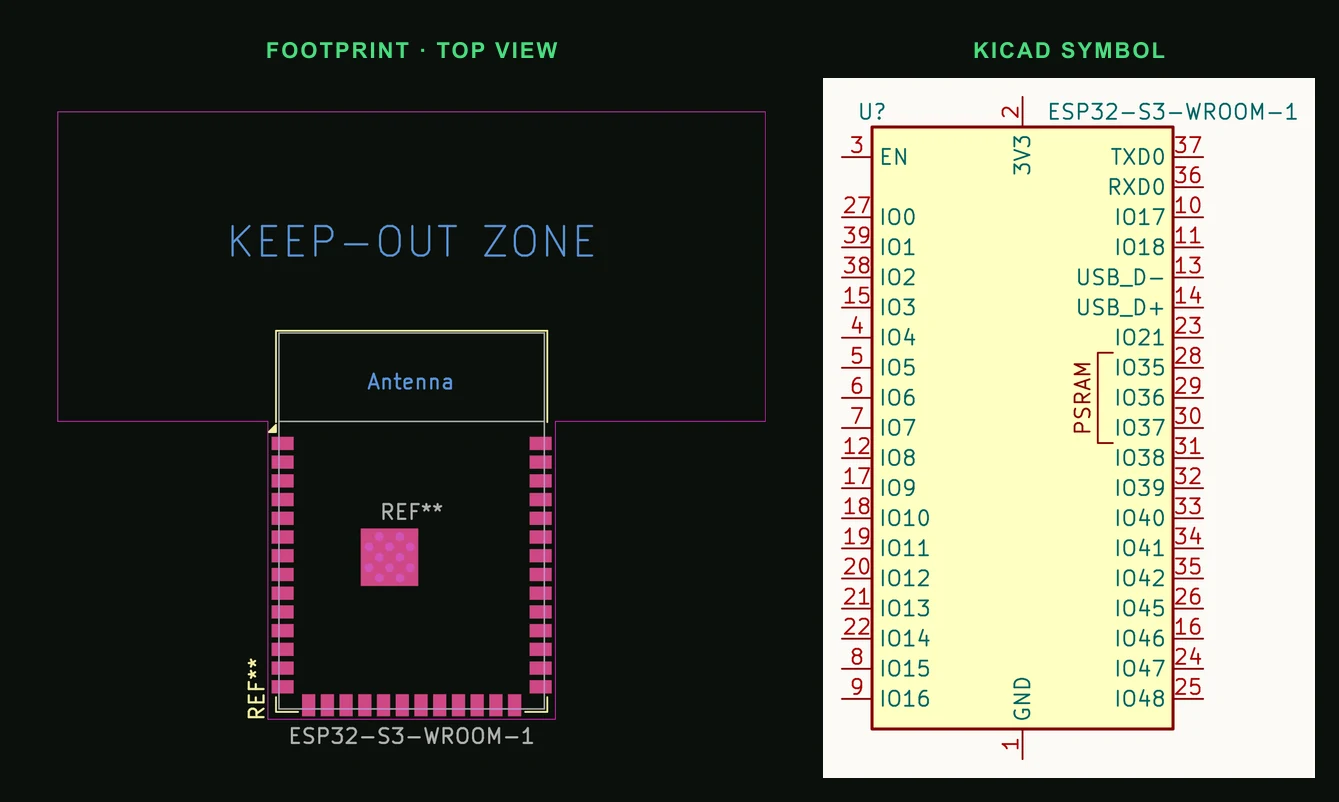
Espressif’s own KiCad library
Espressif maintains a KiCad library on GitHub with symbols, footprints and 3D models for its chips, modules and development boards. It fills the gaps in KiCad’s own:
| What it adds | Examples |
|---|---|
| Newer modules | ESP32-C6-WROOM-1 and -1U, ESP32-C5-WROOM-1 and -MINI-1, ESP32-H2-MINI-1 and -WROOM-02C, ESP32-S31-WROOM-1 and -3, ESP32-WROOM-DA |
| Newer chips | ESP32-C6, ESP32-C61, ESP32-H2, ESP32-S31, ESP32-P4 and ESP32-P4X, ESP8684 (ESP32-C2), ESP8685 |
| Development boards | ESP32-DevKitC, ESP32-DevKitM-1, ESP32-S3-DevKitC, ESP32-C3-DevKitM, ESP32-C5-DevKitC-1, ESP32-C6-DevKitC-1 and -DevKitM-1, the ESP32-S2 Saola-1, DevKitC-1 and DevKitM |
| 3D models | For its footprints, in an espressif.3dshapes folder |
To install it, as its README describes:
- In KiCad’s project window, open the Plugin and Content Manager.
- Click Manage…, then Add Repository, and paste
https://raw.githubusercontent.com/espressif/kicad-libraries/main/repository.json. - Find Espressif Library in the list, click Install, and apply the change.
- The symbols and footprints now appear as PCM_Espressif in the symbol and footprint choosers.
Without network access, download espressif-kicad-addon.zip from the repository’s latest release and use Install from File… in the same manager, without unzipping it. The README says the library is meant for KiCad 10; it keeps separate steps for KiCad 6, 7 and 8.
How to add an ESP32 to a KiCad design
- In the schematic editor press A, search for the exact module name, and place it.
- Open the symbol’s properties (E) and read the Footprint field. Change it if it does not name your exact module (see the first check below).
- Wire 3V3 with its decoupling, EN with its pull-up and capacitor, GND, IO0 for boot, and the USB or UART pins.
- Run the electrical rule check, then Update PCB from Schematic (F8) and place the module with its antenna end at the board edge.
What goes around the module, from the EN delay to USB and the regulator, is on ESP32 PCB design; the pin functions are on the ESP32-S3-WROOM-1 pinout.
Three footprint checks before you order
1. The symbol’s footprint is your module’s. A symbol’s default footprint is a convenience, not a promise. In KiCad 9.0.9 the ESP32-WROOM-32E symbol points at the ESP32-WROOM-32D footprint, although an ESP32-WROOM-32E footprint sits in the same library, and the ESP32-S3-MINI-1 symbol points at the ESP32-S2-MINI-1 footprint. Compare the land with the module datasheet’s recommended PCB land pattern, and pick the footprint named for your module when there is one.
2. The antenna keep-out stays. KiCad’s ESP32-S3-WROOM-1 footprint carries a rule area across the antenna end, 48 × 21 mm, on every copper layer: no tracks, vias, pads, copper pour or other parts inside it. Your ground pour stops at it by itself. Do not delete it to make room; place the module at the board edge with the antenna end outward instead, as Espressif’s hardware guidelines ask.
3. PSRAM takes pins. The symbol brackets IO35, IO36 and IO37 as PSRAM. On modules with Octal PSRAM (R8 or R16V in the part number, such as N16R8), those three pins are wired to the PSRAM inside the can, so leave them unconnected on your board.
A U at the end changes the footprint
DevKitC, NodeMCU and ESP32-CAM boards
For a carrier board that a development board plugs into, Espressif’s library has footprints for its own boards: ESP32-DevKitC, ESP32-S3-DevKitC, ESP32-C3-DevKitM, ESP32-C5-DevKitC-1 and ESP32-C6-DevKitC-1 among them. KiCad’s own library has the ESP32-C3-DevKitM-1.
NodeMCU-style boards and the ESP32-CAM come from other makers, and neither library has them. Draw two pin headers from the board maker’s drawing and check them against the board in your hand, since boards sold under the same name differ in width and pin order.
Skipping the library hunt
PCBEditor’s library carries Espressif’s footprints for more than 60 ESP32 modules and development boards. Describe the board, and it picks the module, places it from that footprint with the pins checked against the module’s pin map, routes the board and checks the rules. The KiCad project it exports carries the footprints inside the board file and the symbols inside the schematic, so it opens in KiCad without installing either library. You still check the antenna end against the board edge, as with any layout.
Common questions
- Does KiCad have an ESP32 library?
- Yes. KiCad’s own RF_Module library has the common ESP32 modules (ESP32-WROOM-32 to -32UE, ESP32-S3-WROOM-1 and -2, ESP32-C3-WROOM-02, ESP32-C6-MINI-1, ESP32-S2 modules) with symbols and footprints, and MCU_Espressif has the bare ESP32-S3, S2, C3 and PICO chips. Nothing needs installing for those.
- How do I add an ESP32 to KiCad?
- Press A in the schematic editor, search for the module name (for example ESP32-S3-WROOM-1) and place it. If KiCad does not have it, install Espressif’s library from the Plugin and Content Manager first. Then check the symbol’s Footprint field before updating the board.
- Where is the ESP32-C6-WROOM-1, ESP32-H2 or ESP32-P4 in KiCad?
- Not in KiCad’s own libraries (KiCad has only the ESP32-C6-MINI-1). Espressif’s KiCad library has them, along with the C5 modules and the ESP32-S31: install it from the Plugin and Content Manager and they appear under PCM_Espressif.
- Is there an ESP32 DevKitC footprint for KiCad?
- Yes, in Espressif’s library: ESP32-DevKitC, ESP32-S3-DevKitC, ESP32-C6-DevKitC-1, ESP32-C5-DevKitC-1 and other Espressif boards, for a carrier board the DevKit plugs into. KiCad’s own library has only the ESP32-C3-DevKitM-1.
- Is there a KiCad library for the NodeMCU-32S or ESP32-CAM?
- Neither KiCad’s library nor Espressif’s has them, because they are third-party boards. Draw the two pin headers from the board maker’s own drawing, and measure the board you actually have: clones of the same name differ.
- Can I use Espressif’s KiCad library in a commercial product?
- Its licence is CC-BY-SA 4.0 with the same exception KiCad uses for its own libraries: designs made with the library’s parts are not bound by the licence’s attribution and share-alike conditions. Read LICENSE.md in Espressif’s repository for the exact terms.
- Which KiCad version does Espressif’s library need?
- Its README says the library is intended for KiCad 10, and gives separate steps for KiCad 6, 7 and 8. KiCad 10 was released in March 2026.
Or describe the board
The editor opens with an ESP32-S3 board described in the chat box. It picks the parts, places the module from Espressif’s footprint, routes the board and exports a KiCad project you can open without installing a library.
Describe an ESP32 board→Sources
Library contents and Espressif’s repository were checked on 24 November 2026. Both libraries grow with each release, so search the library before assuming a part is missing.
- KiCad 9.0.9 libraries, read in the kicad/kicad:9.0 image: RF_Module.kicad_sym, MCU_Espressif.kicad_sym and RF_Module.pretty (symbols, footprints, each symbol’s Footprint field, the ESP32-S3-WROOM-1 rule area). A KiCad 10 copy of the symbol library lists the same Espressif parts.
- Espressif, kicad-libraries on GitHub: README (contents, installation through the Plugin and Content Manager, PCM_Espressif, KiCad 10), LICENSE.md (CC-BY-SA 4.0 with exception) and release 4.0.0.
- Espressif, ESP32-S3-WROOM-1 and WROOM-1U datasheet v1.8, Table 3-1: IO35 to IO37 connect to the Octal PSRAM on modules with R8 or R16V in their name.
- kicad-cli 9.0.9: sym export svg and fp export svg of RF_Module:ESP32-S3-WROOM-1 for the figure.