Schematic symbols: a chart of electronic circuit symbols, drawn by KiCad
Every chart on this page is a real schematic sheet. KiCad drew it from its own symbol libraries, the same libraries PCBEditor takes part symbols from. Under each symbol you’ll find its common name and the name to search for in KiCad. The notes explain the details that matter when you read or draw a schematic: which end is which, what the arrows mean, and which pin is which.
Last reviewed
Short answer
A schematic symbol is the drawing that stands for one part in a circuit diagram. A resistor is a box (IEC) or a zigzag (ANSI), a capacitor two plates, a diode a triangle against a bar, and a transistor a circle with an arrow on one lead. Each symbol carries a reference designator: a letter for the kind of part (R resistor, C capacitor, D diode, Q transistor, U chip) and a number. Its pins are numbered to match the pads of the part’s footprint on the PCB.
Resistor symbols
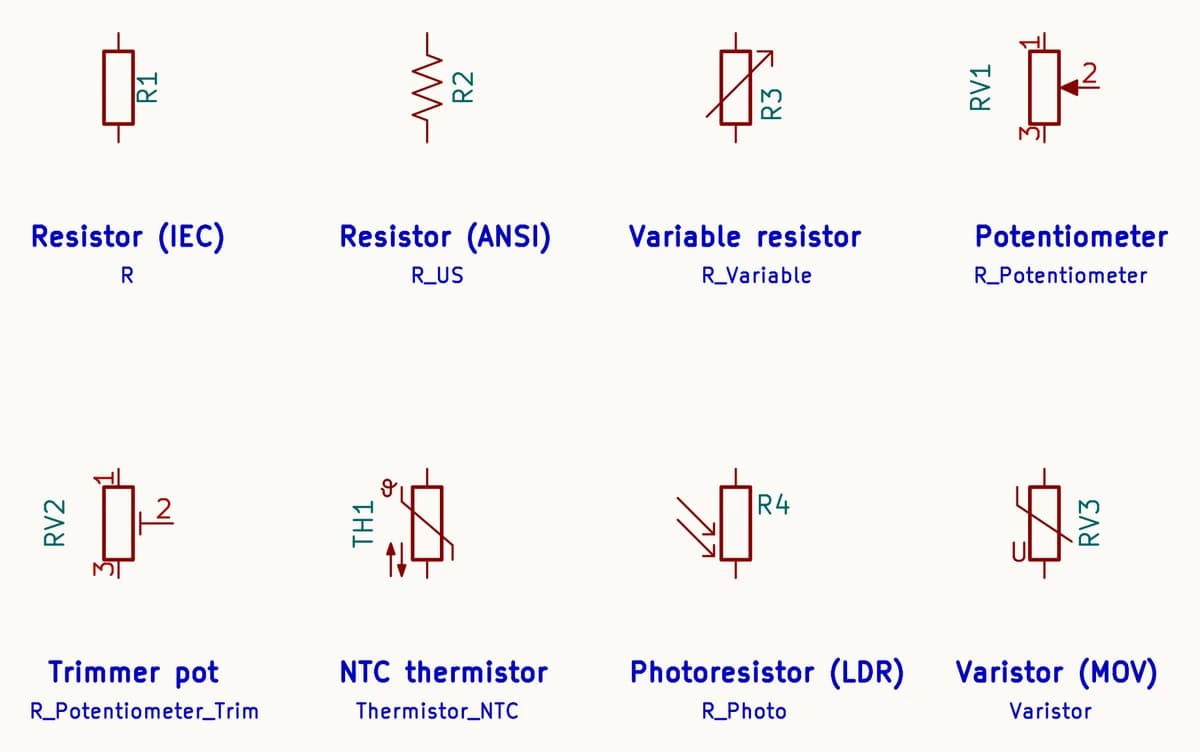
The plain resistor has two drawings: the IEC box and the ANSI zigzag. Both mean a fixed resistor and neither has a polarity. A diagonal arrow across the body means a variable resistor. A potentiometer has three pins, the two ends and the wiper, and KiCad numbers the wiper 2. A trimmer is a potentiometer you set once with a screwdriver, which is why its wiper ends in a flat bar rather than an arrow.
Three resistors respond to something other than current. In the NTC thermistor, the ϑ marks temperature and the two opposed arrows mean resistance falls as temperature rises (KiCad’s PTC version draws both arrows pointing the same way). The photoresistor (LDR) has light arrows pointing in. The varistor (MOV) clamps voltage spikes. Its bent diagonal stroke is the IEC mark for a resistance that changes non-linearly, and the U beside it says the change follows voltage.
Capacitor, inductor and crystal symbols
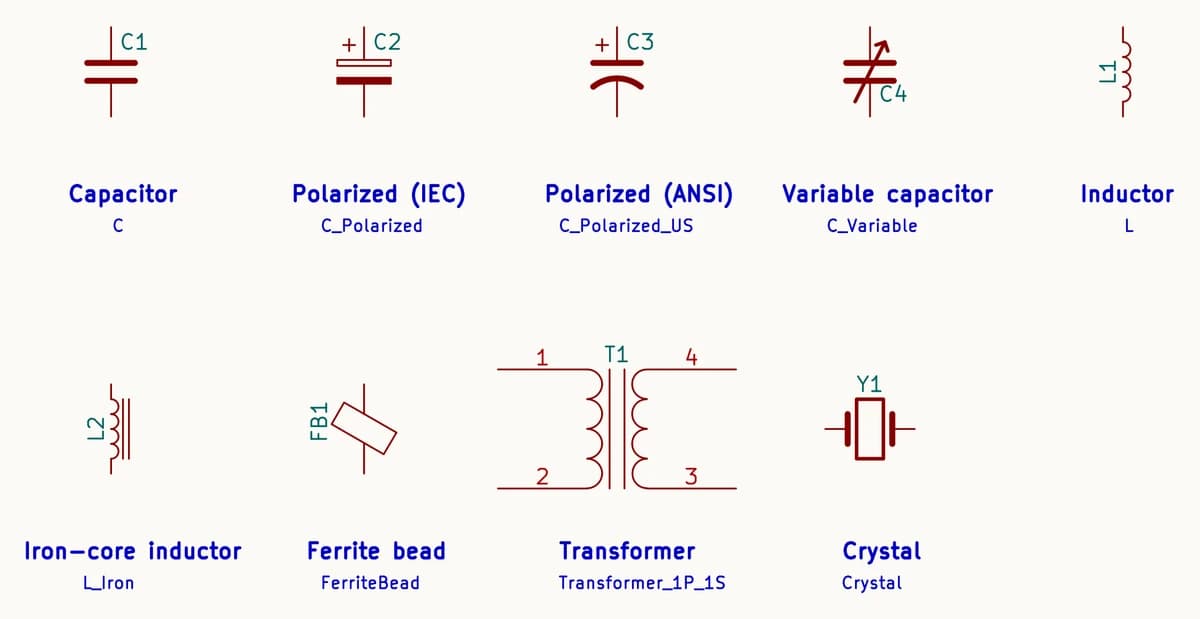
A capacitor is two plates. If one is marked +, the capacitor is polarized (electrolytic or tantalum) and must be fitted the right way round. In the ANSI drawing the curved plate is the negative one. A diagonal arrow means a variable capacitor. An inductor is a row of loops; two straight lines alongside mean an iron core. A ferrite bead, which filters high-frequency noise off a supply line, is a small block drawn across the wire.
The transformer is two windings either side of a core. In KiCad’s symbol the primary is pins 1 and 2 and the secondary 3 and 4. A crystal is a quartz block between two plates; the crystal for a microcontroller’s clock usually sits beside it with a small capacitor from each pin to ground.
Diode and LED symbols
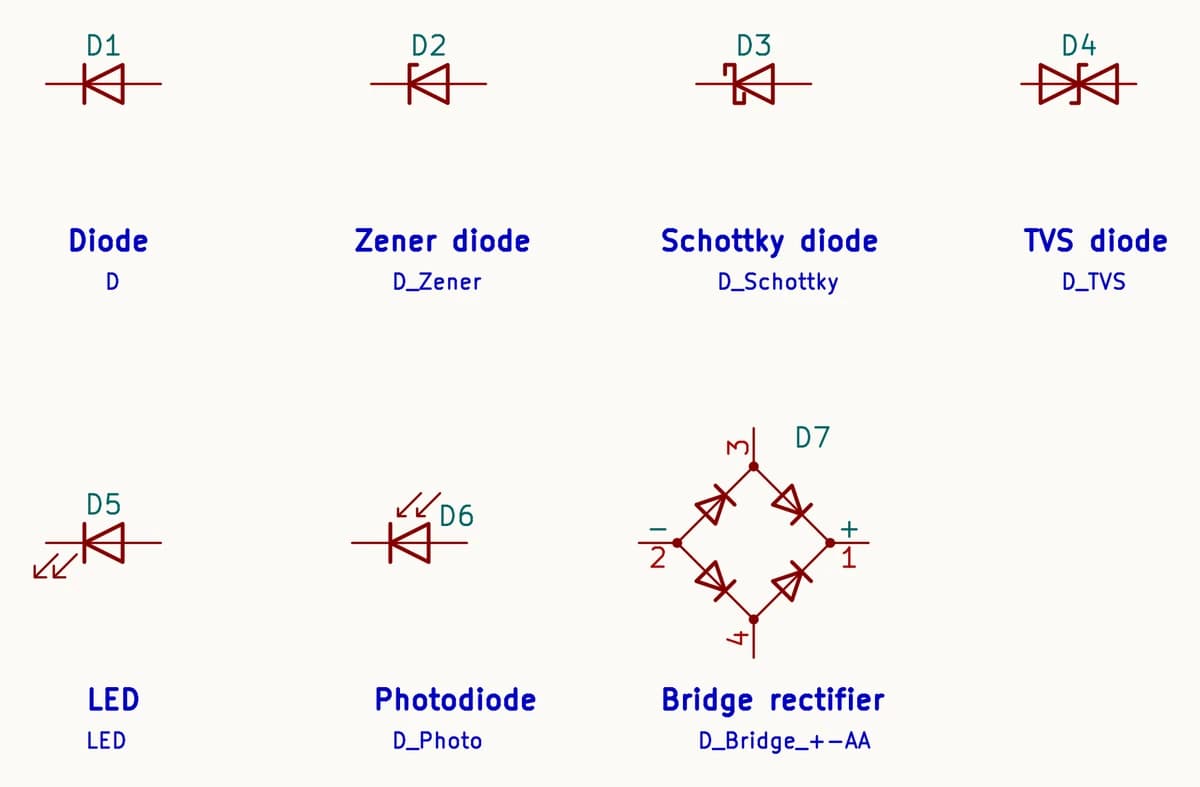
Every diode is a triangle pointing at a bar. Current flows the way the triangle points, from anode to cathode, and the bar is the cathode: the same end as the band printed on the part. The bar’s ends tell you the type: bent ends for a Zener, which holds a fixed reverse voltage, and S-shaped hooks for a Schottky, which drops less voltage forward. KiCad’s D_TVS draws a bidirectional TVS (two diodes back to back) for clamping spikes either way. A unidirectional TVS is usually drawn like a Zener.
Arrows leaving the symbol mean light out (an LED). Arrows entering mean light in (a photodiode). A bridge rectifier is four diodes in a diamond: AC on the two side corners, + and − on the others.
An LED backwards does not light
Transistor and MOSFET symbols
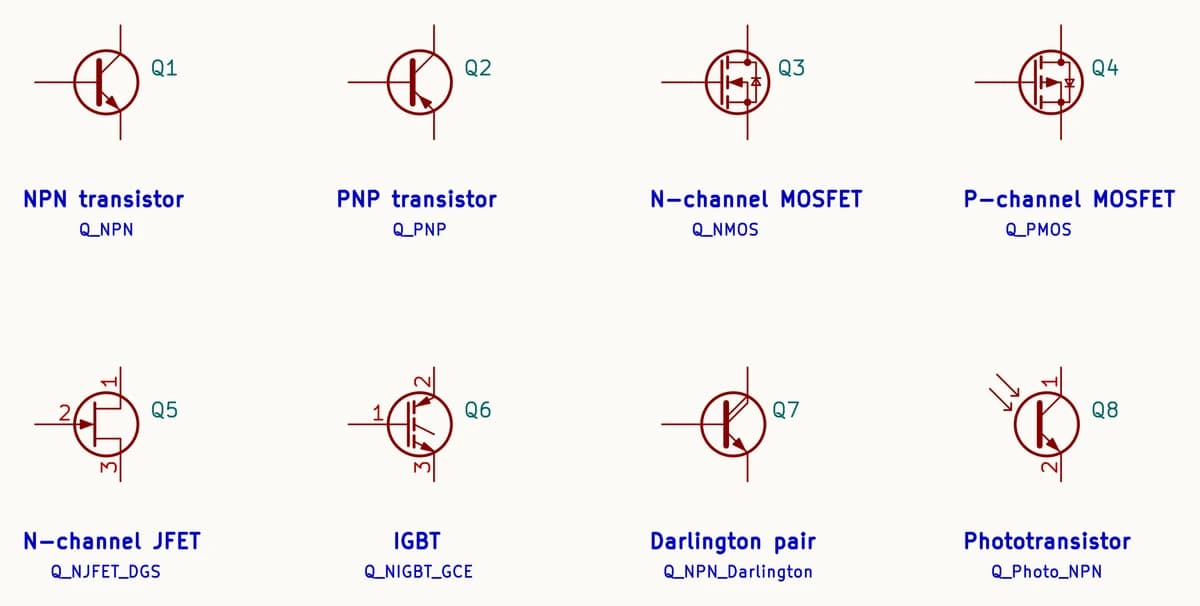
A bipolar transistor has a base, a collector and an emitter. The arrow is on the emitter and shows conventional current: out for NPN, in for PNP. A MOSFET has a gate, a drain and a source. KiCad’s MOSFET symbols draw the channel, the arrow (pointing in for N-channel, out for P-channel) and the body diode that almost every power MOSFET has between source and drain. A JFET’s arrow is on its gate. An IGBT combines a MOSFET’s gate with a bipolar transistor’s collector and emitter. A Darlington pair is two transistors in one package for high gain, and a phototransistor has no base pin because light drives it.
Same symbol, different pin order
Ground, power and battery symbols
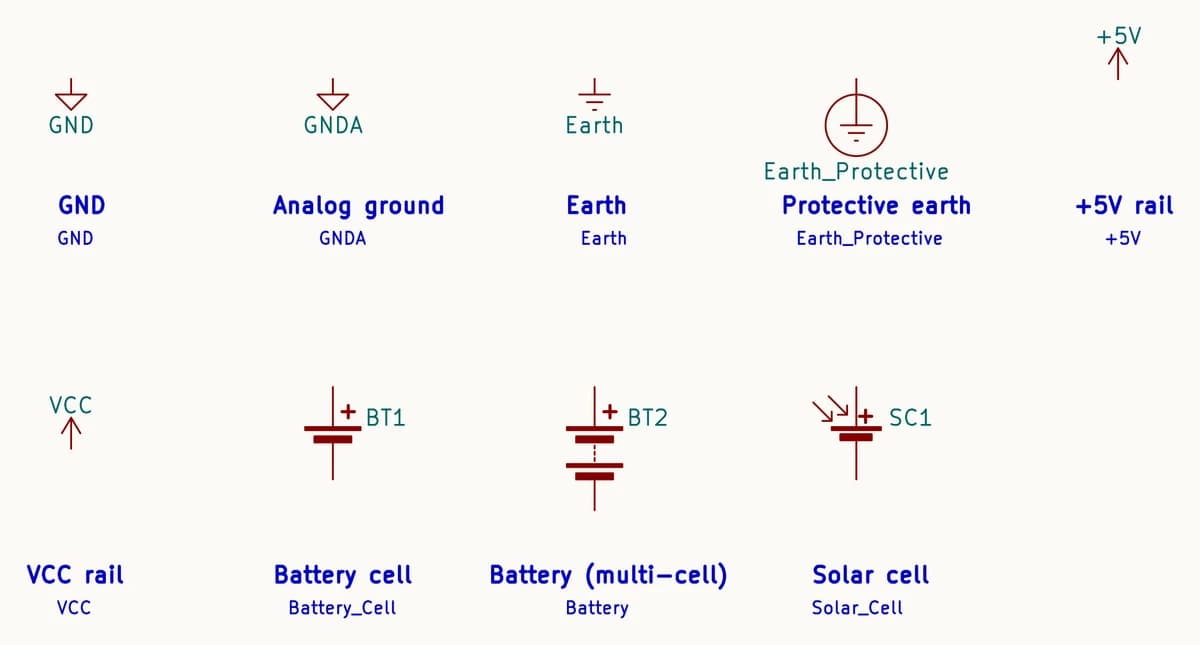
Ground and supply symbols are not parts: each one is a net name. Every GND symbol on a sheet is the same net, so you rarely draw a ground wire across the page. GNDA (analog ground) looks the same but is a separate net, which is the point: analog and digital grounds stay apart until you join them in one place on purpose (see AGND, DGND and chassis ground). Earth (three shrinking bars) and protective earth (the circled version) are for mains-connected equipment. Supply rails such as +5V and VCC work the same way as ground: the name is the net.
A battery cell is a long thin plate (positive) and a short thick one (negative). Several cells drawn in a stack mean a multi-cell battery. A solar cell is a cell with light arrows pointing in.
Switch, relay and fuse symbols
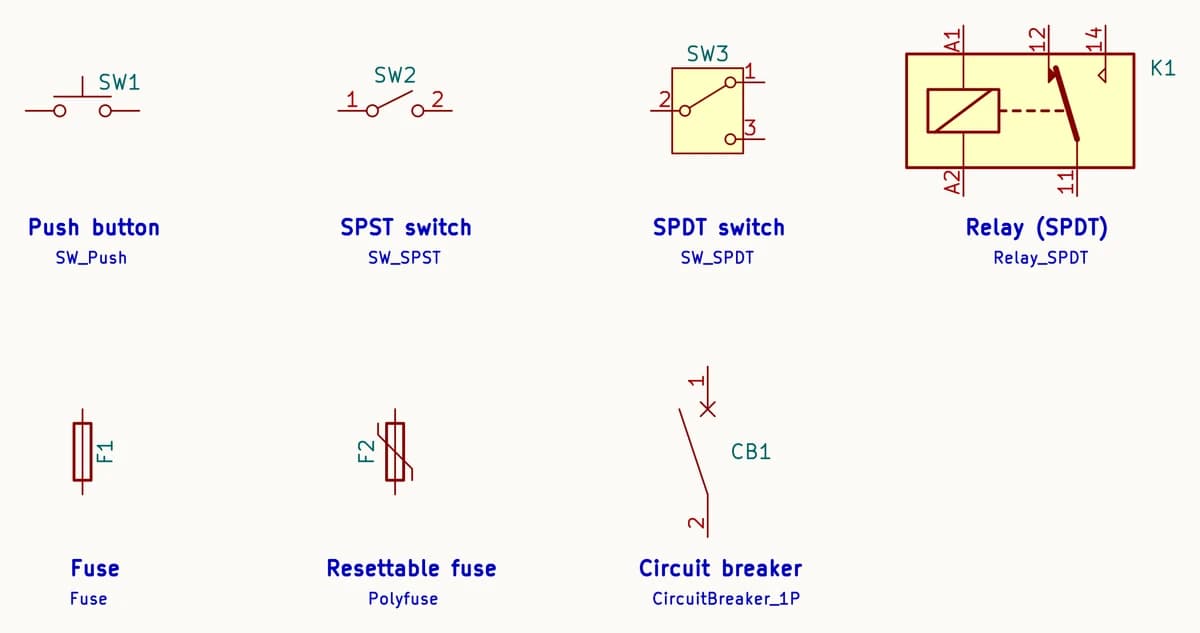
A push button closes only while it is pressed. An SPST switch (single pole, single throw) is a plain on–off switch. An SPDT switch connects its common, pin 2 in KiCad’s symbol, to one of two outputs. A relay is a coil and a switch drawn in one box, with a dashed line showing the coil moves the contact. Relays use standard numbers: the coil is A1–A2, the common contact 11, normally closed 12 and normally open 14.
A fuse is a box with the wire running through it. The resettable fuse (polyfuse, a PTC that resets when it cools) adds the same bent stroke as the varistor: a part whose resistance changes non-linearly, here sharply as it heats. A circuit breaker is drawn as a switch that trips.
Motor, speaker, lamp and antenna symbols
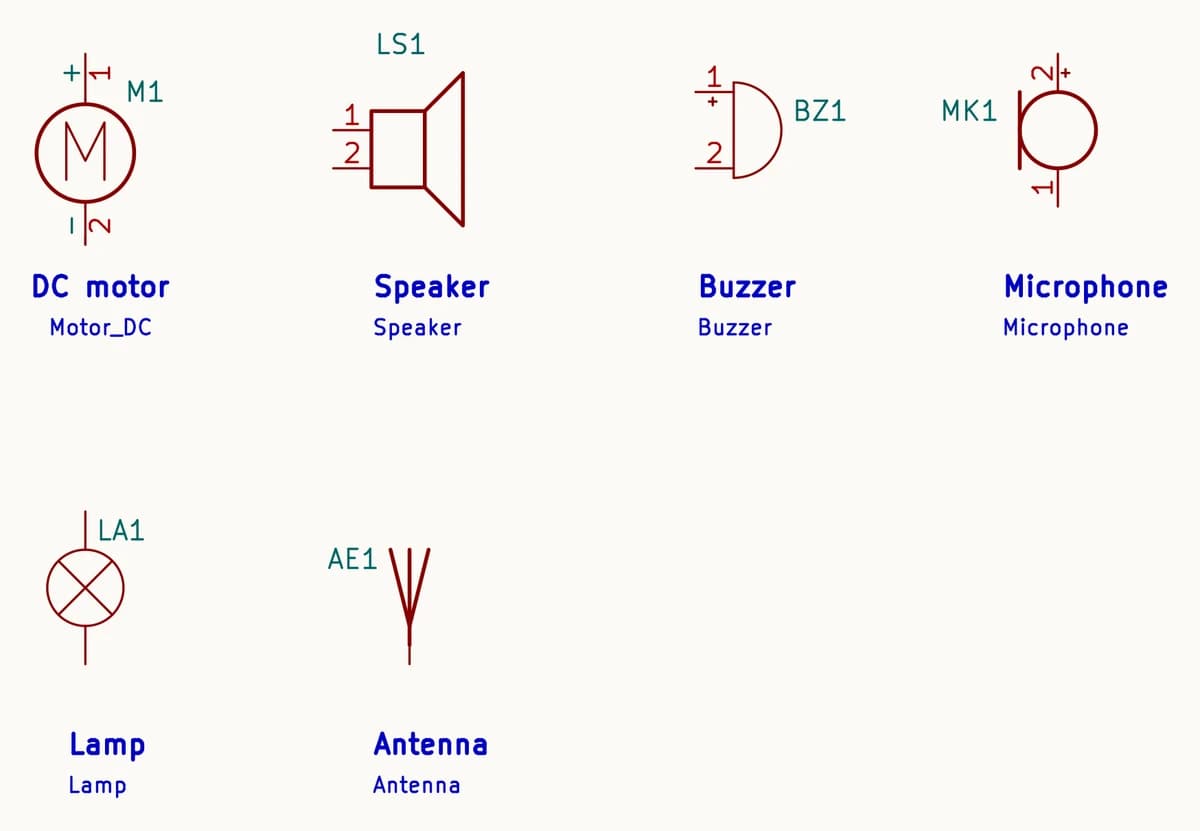
A motor is an M in a circle; a DC motor marks its + pin, which sets the direction it turns. A speaker is a small box with a cone. A buzzer is a half-disc whose + pin matters for the self-oscillating kind. A microphone is a circle with a bar on one side, a lamp a circle with a cross, and an antenna a short fork.
Logic gate and op amp symbols
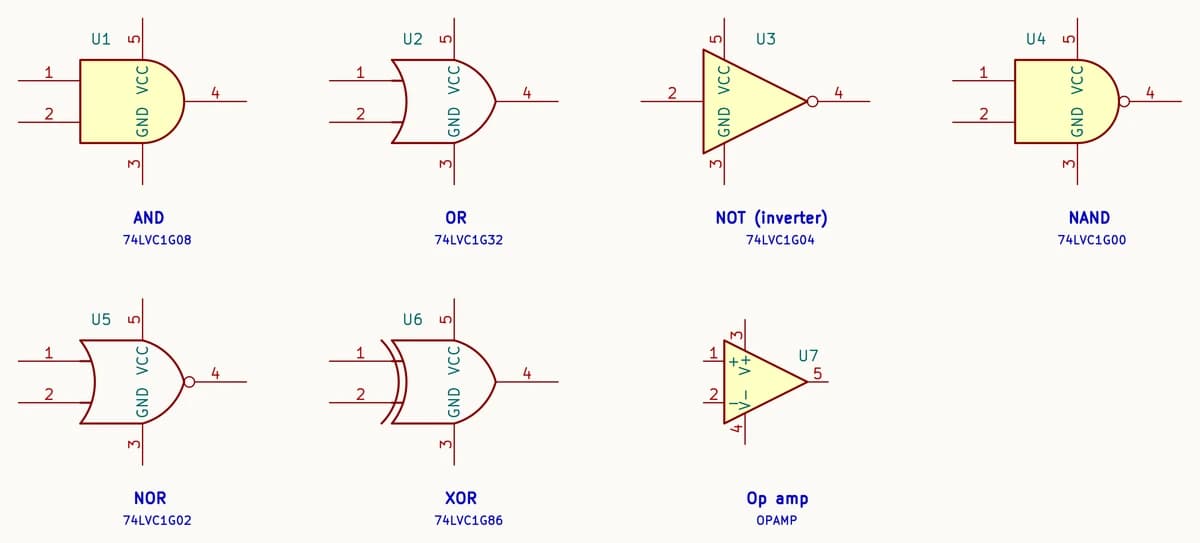
The gates above are the ANSI (distinctive-shape) symbols: a flat-backed D for AND, a curved shield for OR, a triangle for NOT, and an extra curved line for XOR. A small circle on an output inverts it, which turns AND into NAND and OR into NOR. KiCad draws each one here as a real single-gate chip from the 74LVC1G family, so you can also see the supply pins (VCC on pin 5, GND on pin 3). The IEC style draws every gate as a rectangle with a label inside instead: & for AND, ≥1 for OR, 1 for a buffer or inverter, =1 for XOR.
An op amp is a triangle with two inputs: + is non-inverting, − is inverting. When KiCad draws the supply pins, they appear above and below the triangle as V+ and V−.
Reference designators: R, C, D, Q, U…
Every symbol on a schematic gets a reference designator: a letter for the kind of part and a number. The same designator is printed on the board next to the part, so R7 on the schematic is R7 on the silkscreen. These are the prefixes KiCad’s libraries use. Most follow IEEE 315 and ASME Y14.44 practice; a few, such as AE and BZ, are common usage:
| Letter | Part |
|---|---|
| R | Resistor |
| RV | Potentiometer, trimmer, varistor |
| TH | Thermistor |
| C | Capacitor |
| L | Inductor |
| FB | Ferrite bead |
| T | Transformer |
| Y | Crystal, resonator |
| D | Diode, LED, rectifier |
| Q | Transistor (BJT, MOSFET, JFET, IGBT) |
| U | Integrated circuit, logic gate, op amp |
| J | Connector |
| SW | Switch, push button |
| K | Relay |
| F | Fuse |
| BT | Battery |
| M | Motor |
| LS | Loudspeaker |
| BZ | Buzzer |
| MK | Microphone |
| AE | Antenna |
| TP | Test point |
IEC or ANSI: two ways to draw the same part
Two standards cover most schematics. IEC 60617, common in Europe and Asia, draws a resistor as a box, and logic gates as labelled rectangles. ANSI/IEEE 315, common in North America, draws a resistor as a zigzag and logic gates with distinctive shapes. Capacitors, diodes and transistors look much the same in both. Neither style is more correct, but mixing them on one sheet confuses readers, so pick one per project. In KiCad the IEC resistor is R, the ANSI one R_US, and the same _US suffix marks the ANSI versions of polarized capacitors, potentiometers and thermistors.
How the symbols connect on a schematic
- A dot is a connection. Wires that meet at a dot are joined. Wires that cross without a dot are not.
- Names connect too. Two wires with the same net label, or two power symbols with the same name, are one net even if no line joins them.
- An X on a pin means not connected on purpose, so the electrical rule check does not report it.
- Pin numbers become pads. When the schematic becomes a board, pin 1 of a symbol connects to pad 1 of its footprint. A mismatch there is the most expensive mistake a correct-looking schematic can hide.
Once you can read the symbols, the next step is drawing your own: the circuit diagram maker lets you place parts, wire them and turn the sheet into a routed board. To go from a finished schematic to a board in your hands, read how to make a PCB.
Common questions
- What are schematic symbols?
- Schematic symbols are standard drawings that stand for electronic parts in a circuit diagram: a box or zigzag for a resistor, two plates for a capacitor, a triangle and bar for a diode, and so on. Each one has a reference designator (R1, C3, Q2) and numbered pins that match the pads of the part's footprint on the PCB.
- What is the symbol for ground?
- In KiCad, the GND net is drawn as a small open triangle on a short stem. Earth is three bars of shrinking width, and protective earth is that symbol inside a circle. Ground symbols are net names: every GND symbol is the same net, and an analog ground such as GNDA is a separate net until you join the two deliberately.
- Which way does a diode symbol point?
- Conventional current flows in the direction the triangle points, from anode to cathode. The bar is the cathode, the same end as the band printed on the diode itself.
- What does the arrow on a transistor symbol mean?
- On a bipolar transistor the arrow is on the emitter and shows the direction of conventional current: out of the transistor for NPN, into it for PNP. On a MOSFET the arrow is on the channel and points in for N-channel, out for P-channel.
- What is the difference between IEC and ANSI symbols?
- They are two drawing styles for the same parts. IEC 60617, common in Europe and Asia, draws a resistor as a box and logic gates as labelled rectangles. ANSI/IEEE 315, common in the US, draws a resistor as a zigzag and logic gates with distinctive shapes. KiCad's libraries include both resistor styles (R and R_US).
- Where can I get schematic symbols for free?
- KiCad's symbol libraries are free, open (CC BY-SA 4.0, with an exception that lets you use them in your own designs), and include tens of thousands of parts. PCBEditor bundles them and uses a part's KiCad symbol when it draws your schematic in the browser.
Draw a schematic with these symbols
Open the editor with a starter request already typed: a small 3.3 V board you can change before you send it. Drawing by hand works without an account; the AI and saving need a free one.
Open the editor with this example→Sources
Chart images are rendered from the KiCad libraries and, like the libraries, are shared under CC BY-SA 4.0.
- KiCad 9 symbol libraries (Device, power, Switch, Relay, Motor, 74xGxx, Simulation_SPICE), gitlab.com/kicad/libraries/kicad-symbols, CC BY-SA 4.0 with the KiCad libraries exception.
- IEC 60617, Graphical symbols for diagrams.
- IEEE 315 / ANSI Y32.2, Graphic Symbols for Electrical and Electronics Diagrams; ASME Y14.44, Reference Designations for Electrical and Electronics Parts and Equipment.
- EN 50005, contact numbering for relays and contactors (11 common, 12 normally closed, 14 normally open).
- Nexperia 74LVC1G08 / 74LVC1G04 datasheets: single-gate pinouts in SOT353 (VCC pin 5, GND pin 3).