A KiCad MCP alternative that designs the whole board
Community KiCad MCP servers let an AI assistant operate KiCad on your machine. PCBEditor’s MCP server is hosted: one call turns a description into a placed, autorouted and checked board, and KiCad files go in and out. Different jobs. Here is how to choose, and how to use both.
KiCad is an excellent free, open-source EDA tool, and the KiCad MCP servers are useful open-source projects. Nothing on this page argues otherwise. The comparison below is from the projects’ own READMEs, not from our testing of them; for the wider map of AI options around KiCad, see KiCad and AI.
PCBEditor MCP vs KiCad MCP servers
| PCBEditor MCP server | Community KiCad MCP servers | |
|---|---|---|
| Where it runs | Hosted at https://api.robodib.com/mcp. Your AI client connects over HTTPS. | On your computer, next to your KiCad install. The AI client starts it. |
| Setup | Add the URL to your client and sign in. Nothing to install. | KiCad 9 or later plus Python, and for some servers Node.js; clone, build and point it at your projects. |
| What one tool call does | design_board returns a complete board: parts, schematic, placement, routing and a design-rule check. | One operation on a KiCad project: add a part, draw a wire, move a footprint, run a check, export. |
| Board from one sentence | Yes, as one async job that the agent follows with get_job. | The assistant builds the design step by step over many tool calls. |
| Who wires the parts | RULe, a deterministic netlist compiler, from KiCad pin types and datasheet pin tables. | The assistant chooses each connection it makes. |
| Autorouting | Sadie, PCBEditor’s own Rust router, built in (route_board). | KiCad has no autorouter; some servers call Freerouting, which needs Java or Docker. |
| Checks | run_drc for design rules, review_board for an AI design review. | KiCad’s own DRC and ERC. |
| Files | Designs live in your PCBEditor account. KiCad .kicad_pcb in; KiCad, Gerber, drill, BOM, CPL, STEP, IPC-2581, ODB++ and PDF out. | Your files stay on your disk, in KiCad’s native format. |
| Parts | Your PCBEditor inventory (datasheets, KiCad symbol and footprint files, 3D models), used by the AI on its own. | Your KiCad libraries; KiCAD-MCP-Server also searches JLCPCB parts. |
| Clients | Any client that supports remote Streamable HTTP, including claude.ai and ChatGPT in a browser. | Desktop and terminal clients that start local servers; the READMEs name Claude Desktop and VS Code with Copilot. |
| Account and source | Free PCBEditor account required. Closed-source hosted service. | No account. Open source (KiCAD-MCP-Server is MIT licensed). |
| Manual work | open_in_editor links to the design in PCBEditor’s browser editor. | KiCad’s schematic and PCB editors, on the same files. |
When to use which
- The design already lives in KiCad and has to stay on your machine.
- You want the agent to automate edits, checks and exports on an existing project.
- Your team’s libraries and review process are built around KiCad.
- You need an open-source toolchain you can run without an account.
- You want a complete first board from a description, routed and checked.
- You work from claude.ai, ChatGPT or another client that only reaches remote servers.
- You do not want to install and maintain KiCad, Python or a router on each machine.
- You want a KiCad board autorouted or checked, then handed back as KiCad files.
Bring a KiCad board in, take KiCad files out
In: import_kicad
import_kicad uploads a .kicad_pcb file to your PCBEditor account. From there the agent can route it with Sadie (route_board), check it (run_drc, review_board), change it by instruction (edit_board) and export it. A prompt is enough:
Import hardware/sensor.kicad_pcb into PCBEditor, autoroute it,
run the design-rule check and tell me what is left to fix.
Out: export_board
export_board returns a time-limited download link for the format you ask for: kicad for KiCad files, or gerber, drill, bom, cpl, step, ipc2581, odb and pdf.
Export my latest board as KiCad files and as Gerbers with drill files.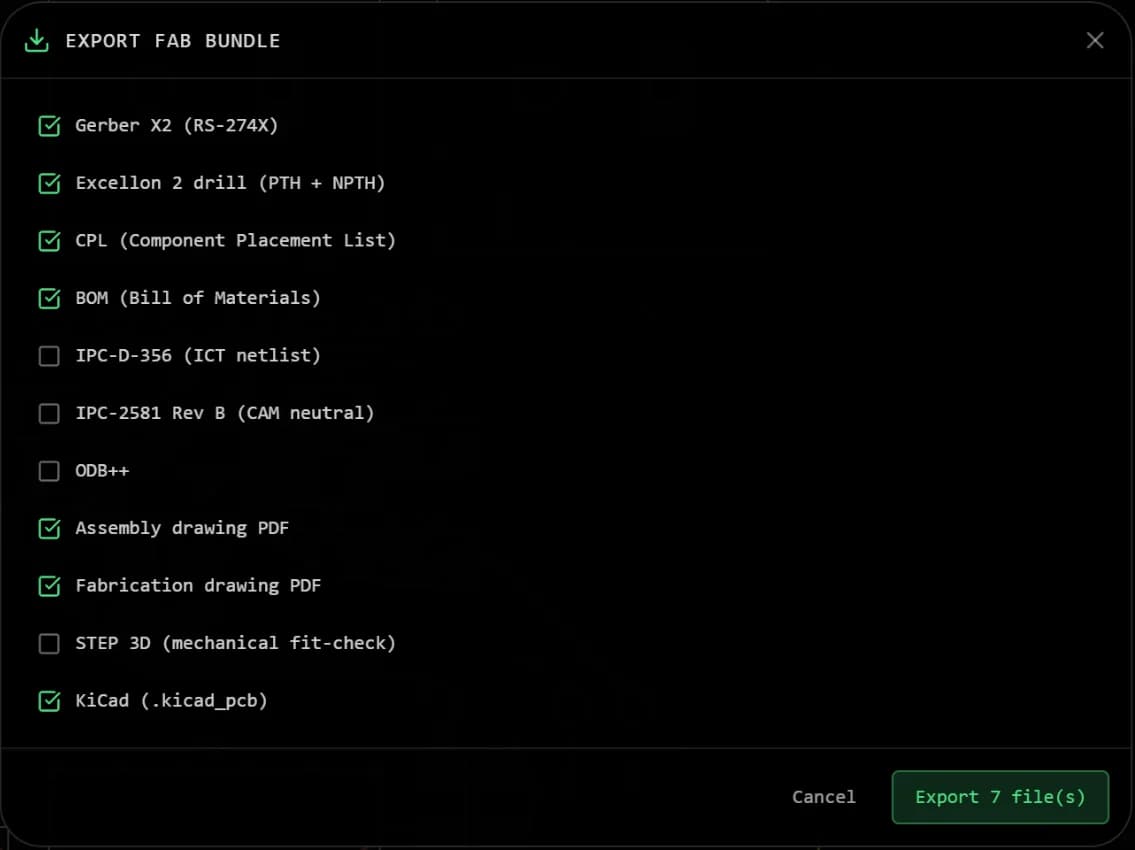
Common questions
- Is there a KiCad MCP alternative that does not need KiCad installed?
- Yes. PCBEditor's MCP server is hosted at https://api.robodib.com/mcp, so your AI client connects to it over HTTPS with nothing installed locally. It designs, autoroutes and checks boards itself, and it reads and writes KiCad files, so KiCad stays available for the work you want to do there.
- Can I use PCBEditor's MCP server and a KiCad MCP server together?
- Yes. A common split is to generate and route the first board with PCBEditor, export it as KiCad files, and continue in KiCad, with or without a KiCad MCP server driving it. The other direction works too: import a .kicad_pcb into PCBEditor to autoroute or check it, then export it back.
- Does PCBEditor replace KiCad?
- Not for everything. KiCad is an excellent free, open-source desktop EDA tool with deep manual layout and library tools. PCBEditor is strongest at getting from a description to a routed, checked first board, and at giving AI agents a server that needs no local setup.
- Can a KiCad MCP server generate a whole board from a description?
- Not in one step. The servers expose individual KiCad operations, and the assistant has to plan the parts, connections, placement and routing call by call. The result depends on the model's sequence, and KiCAD-MCP-Server's README says AI-generated design suggestions do not replace qualified engineering review. PCBEditor's design_board does the whole run as one job with deterministic wiring and routing engines.
- How do I check a board after the round trip?
- Open the exported KiCad files in KiCad and run KiCad's DRC with your fab's rules, and check the Gerbers in a viewer before ordering. Treat every generated or converted board as a draft for review.
Sources
Statements about KiCad MCP servers come from the projects’ own pages, checked 20 October 2026.
Try it on one of your own boards: create a free account, connect your AI tool with the setup pages, and import a .kicad_pcb.