Alternatives to KiCad, and when you shouldn’t switch at all
KiCad is free, open source, runs on Windows, macOS and Linux, and has become good enough for professional products. So when people look for an alternative, it is rarely because KiCad can’t make their board. It is because it takes a while to learn, it doesn’t run in a browser, it has no built-in autorouter or AI generation, or they need features of a commercial suite. Each of those has a different answer, and sometimes the answer is to keep KiCad and add one piece.
Last reviewed
Short answer
For an easier start: EasyEDA. For a browser tool with AI: PCBEditor or Flux. For AI that produces the routed board from a description: PCBEditor, which also writes native KiCad files so you can come back. For professional depth: Altium. If KiCad itself is fine and you only miss autorouting or AI, add Freerouting or an MCP server instead of switching.
Alternatives by the reason you’re looking
- “KiCad takes too long to learn.”
- EasyEDA is the gentlest start, especially if you order from JLCPCB with LCSC parts. PCBEditor skips drawing for a first draft: describe the board and get a routed one to learn from.
- “I want to design in a browser, on any device.”
- EasyEDA runs in a browser. Flux is a browser editor with an AI agent and real-time collaboration. PCBEditor runs in a browser on phones and tablets too, with nothing to install.
- “I want AI to do the design work.”
- PCBEditor takes a description to a placed, routed, checked board. Flux’s agent drafts and helps lay out inside its editor. Or keep KiCad and let an AI agent drive it through an MCP server; see KiCad and AI.
- “I need professional depth: signal integrity, managed libraries, teams.”
- Altium Designer is the common choice, sold by subscription per seat. CircuitMaker is Altium’s free Windows tool for personal projects.
- “KiCad has no autorouter.”
- It doesn’t ship one; many people use the open-source Freerouting with it. EasyEDA has a built-in autorouter. PCBEditor routes every board with its own router and names any net it couldn’t complete. See the free PCB autorouter.
What each kind of tool covers
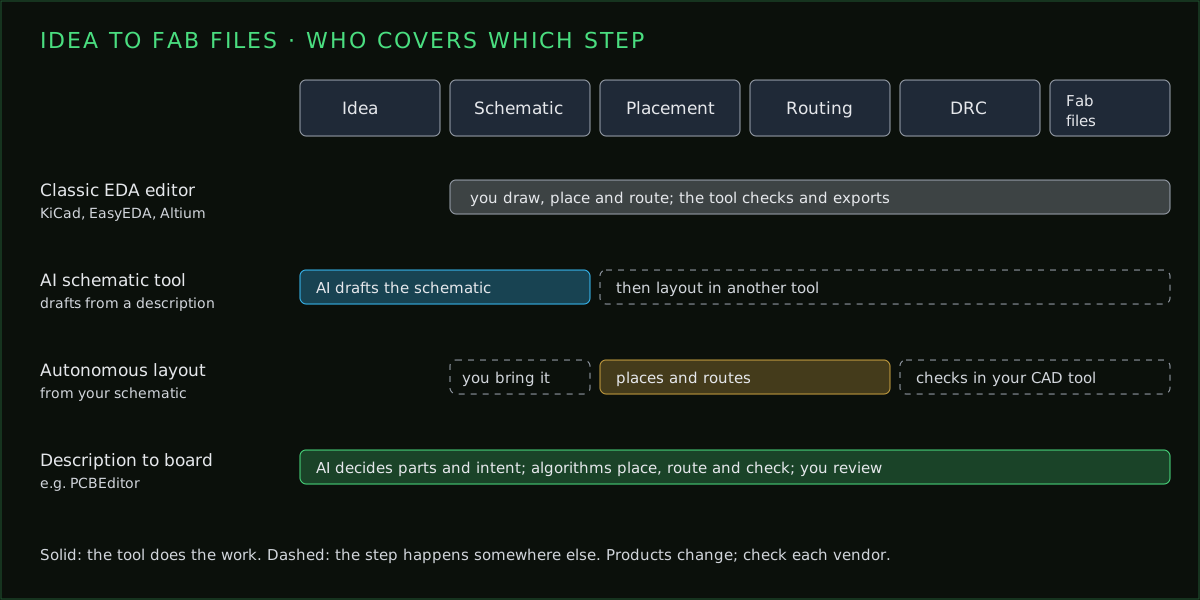
EasyEDA and Altium are the same kind of tool as KiCad, with different trade-offs; the three-way comparison goes through them. AI tools change the job itself: some draft the schematic, some lay out a schematic you already have, and some go from a description to a routed board.
Using another tool without leaving KiCad
You don’t have to choose one tool for everything. PCBEditor reads and writes native .kicad_pcb files: you can generate a first layout from a description, open it in KiCad and finish it there, or bring a KiCad board in to edit it in the browser. KiCad can also import designs from EasyEDA, Altium and others, so starting somewhere easier doesn’t lock you out of KiCad later.
What you give up by leaving KiCad
It is easy to list what an alternative adds and forget what KiCad already gives you. Check these before you move a real project:
- Open file formats. KiCad’s files are plain text you can diff, version in Git and open in twenty years. A cloud tool’s project format is only as durable as the service.
- Working offline. KiCad needs nothing but your machine. Browser tools need a connection, at least for their AI features.
- No account or licence. KiCad never asks you to sign in, and the GPL means nobody can change those terms later.
- Community libraries and answers. Footprints, symbols, plugins, forum threads and tutorials for KiCad exist in a volume that newer tools haven’t built yet.
- Professional reach. Many open-hardware projects and a growing number of companies ship real products from KiCad, so the skill carries.
None of this is a reason never to use another tool. It is a reason to use one for the part of the job it is better at, and keep your designs in a format you control. A tool that can write native KiCad files, as PCBEditor does, lets you do both.
When KiCad is still the right answer
Stay with KiCad if you want a tool that is free with no conditions, works offline on any operating system, keeps your designs in open file formats, and has a large community and library ecosystem. For most boards up to six layers it is as capable as anything here. If what you miss is an autorouter or AI help, add those to KiCad rather than leaving it.
Common questions
- What is easier than KiCad?
- EasyEDA is the easiest editor to start with, particularly with JLCPCB and LCSC. If you would rather not draw the first version at all, PCBEditor generates a routed board from a description.
- Is there an online version of KiCad?
- KiCad itself is a desktop application. EasyEDA, Flux and PCBEditor run in a browser, and PCBEditor reads and writes KiCad's .kicad_pcb board files.
- Is EasyEDA better than KiCad?
- EasyEDA is easier to start and better integrated with LCSC and JLCPCB. KiCad is open source, works fully offline on every major OS and has more depth for complex boards.
- Can I use AI with KiCad?
- Yes. MCP servers let an AI agent such as Claude drive KiCad directly, and PCBEditor can generate a board you then open in KiCad as a native file.
- Does KiCad have an autorouter?
- KiCad has an excellent interactive push-and-shove router but no built-in autorouter. Many users run the open-source Freerouting alongside it.
Start in the browser, finish in KiCad
Describe the board, let PCBEditor place and route it, then open the native .kicad_pcb file in KiCad for the finishing work.
See the KiCad workflow→Sources
From each vendor's or project's own published material, checked 7 October 2026. None of it is our own testing of their products.
- KiCad: kicad.org release announcements for version 10.0 (20 March 2026) and later 10.0.x releases; licence GPL-3.0.
- EasyEDA: easyeda.com plans and pricing page; EasyEDA Pro documentation.
- Flux: Spring 2026 Updates post on flux.ai.
- Altium: altium.com product pages; CircuitMaker documentation.
- KiCad MCP servers: the KiCAD-MCP-Server project README.