Alternatives to Altium Designer, and what you give up with each
Altium Designer is the tool many professional teams standardise on, and it is sold by subscription per seat. For an individual, a student or a small company building simpler boards, that is a lot to pay for features you may never open. Every alternative below is cheaper; the honest question is which of Altium’s strengths you would be giving up, and whether your boards need them.
Last reviewed
Short answer
The closest free alternative is KiCad: open source, cross-platform, able to import Altium designs, and good enough for most two- to six-layer boards. CircuitMaker gives you Altium’s own engine for free on Windows for personal projects. EasyEDA is the easiest start if you order from JLCPCB. For a first draft from a description, PCBEditor is free in the browser. Stay on Altium for high-speed, regulated or team work.
What Altium gives you
Before choosing a cheaper tool, be clear about what you are paying for now:
- Signal-integrity and constraint tools for high-speed interfaces.
- Managed component libraries tied to supply-chain data.
- Mechanical CAD integration for boards that must fit an enclosure exactly.
- Team collaboration, review and release management on shared projects.
- Mixed-signal simulation inside the same tool.
If you use none of these, almost any alternative will do. If you use one or two, check that specific capability in the alternative before you switch.
The alternatives, and the trade-off of each
| Tool | Cost | What you get | What you give up |
|---|---|---|---|
| KiCad | Free, open source (GPL-3.0) | Windows, macOS and Linux; works offline; imports Altium designs; version 10 adds high-speed length tuning and design variants. | Signal-integrity analysis, managed libraries with supply-chain data, and Altium’s team collaboration. |
| CircuitMaker | Free, from Altium | Altium’s engine and editor style; up to 16 signal and 16 plane layers; a free cloud workspace. | Windows only, and built for personal projects: up to five private projects per user, the rest shared with its community. |
| EasyEDA | Free | Runs in a browser or desktop client; LCSC parts and JLCPCB ordering built in; imports Altium files. | Depth for complex high-speed boards; the workflow is built around one supply chain. |
| PCBEditor | Free | Describe a board and get a placed, routed, checked design in the browser; exports Gerber, drill, BOM, pick-and-place and KiCad files. | It doesn’t import Altium files, has no signal-integrity analysis and isn’t built for high-speed or RF work. |
| Quilter | Paid, per project by unrouted pins | Keeps you in Altium: takes and returns native Altium files and automates placement and routing. | It isn’t a replacement editor; you still need Altium or another tool for the schematic and review. |
Altium also sells lower-priced tiers alongside Designer. If your team wants to stay in Altium’s ecosystem and only needs fewer seats or features, compare those on Altium’s own site before moving tools.
Where each sits in the workflow
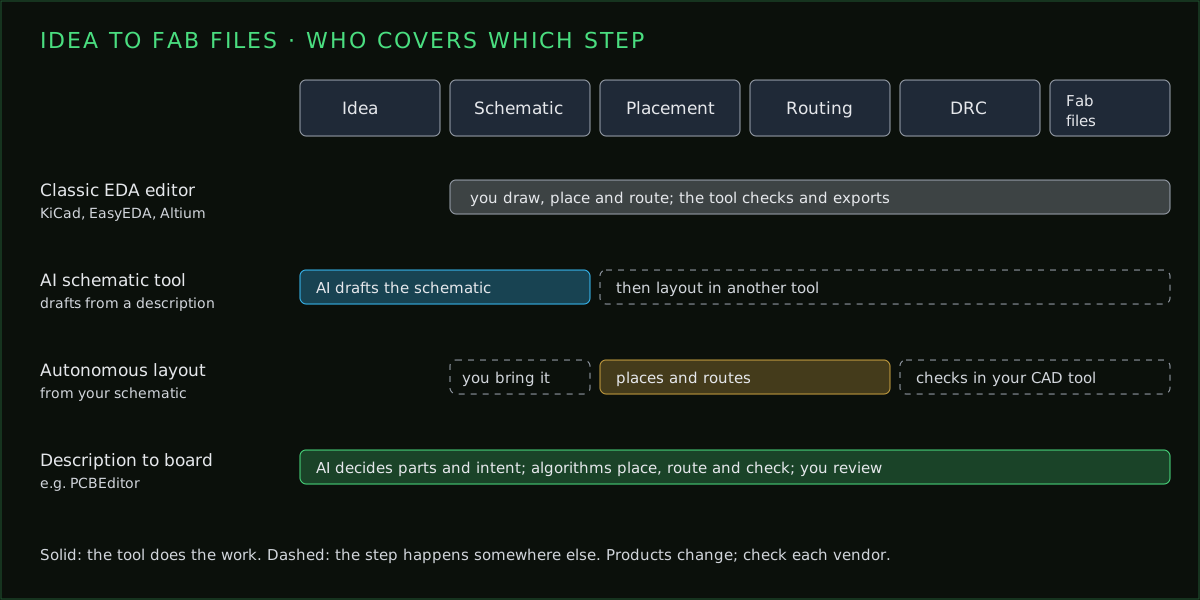
The editors in the table do the same job as Altium with you at the controls. AI tools change who does the work: Quilter automates layout inside your existing flow, and PCBEditor starts earlier, from a written description, and hands you a routed board to review. The AI tools for PCB design page goes through them in detail.
Moving an Altium design to KiCad
- Import the Altium project into KiCad, schematic and board together.
- Check every footprint against its datasheet; library mapping is where imports go wrong.
- Re-enter the design rules and net classes in KiCad’s board setup; don’t trust that they came across.
- Check the layer stackup, including plane assignments and copper weights.
- Run the design-rule and electrical checks, and compare the netlist with the original.
- Export Gerbers and compare them layer by layer with the Altium output in a Gerber viewer.
A clean import isn’t a clean board
Questions to answer before you switch
- Which Altium features did your last three boards actually use? Look at real projects, not the feature list. If signal-integrity analysis, MCAD co-design and managed libraries never came up, you are paying for capacity you don’t use.
- Who else opens your files? If customers, contract manufacturers or colleagues expect Altium projects, a switch moves the cost to them, or back to you as conversions.
- Where do your libraries live? Years of verified footprints and symbols are often the most valuable thing in an Altium install. Plan how they move, and budget to check them.
- What happens to existing designs? You don’t have to convert everything. Many teams keep finished products in Altium for revisions and start new boards in the new tool.
- Can you try it on a real board first? Every alternative here is free to try. Rebuild one recent, modest board end to end, through Gerbers, before deciding.
When to stay on Altium
Stay if your boards carry DDR, PCIe, high-speed SerDes or RF and you rely on Altium’s signal-integrity and constraint tools; if your company’s libraries and release process live in Altium; or if several engineers work on the same designs every day. The licence is expensive for one person drawing simple boards, and cheap compared with a failed production run.
Common questions
- Is there a free version of Altium Designer?
- Altium offers a free trial of Altium Designer, and CircuitMaker, a separate free tool built on Altium's engine for personal projects on Windows.
- What is the best free alternative to Altium?
- KiCad for most people: it is free, open source, runs on Windows, macOS and Linux, imports Altium designs, and handles most two- to six-layer boards well.
- Can KiCad open Altium files?
- Yes. KiCad imports Altium Designer projects. Check footprints, design rules and the stackup after import; moves between tools are rarely perfect.
- How much does Altium cost?
- Altium sells Designer and its newer tiers by subscription, priced per seat, with plans for individuals, teams and enterprises. Prices change, so check Altium's own pricing page.
- Can I use an AI tool instead of Altium?
- For prototypes and simpler boards, an AI tool can take a description to a routed board, and PCBEditor exports KiCad and Gerber files that Altium and other tools can read. For high-speed and regulated products, a full EDA suite is still the right tool.
Not every board needs a licence
For prototypes and small runs, describe the board, review the generated layout in the browser and export fabrication files. Keep Altium for the boards that need it.
Try it free→Sources
From each vendor's own published material, checked 7 October 2026. Prices and plans change; confirm with the vendor.
- Altium: altium.com product and pricing pages; CircuitMaker documentation (What’s new, projects and workspace).
- KiCad: kicad.org release announcements for version 10.0 (20 March 2026); licence GPL-3.0.
- EasyEDA: easyeda.com plans and pricing page; EasyEDA Pro documentation.
- Quilter: quilter.ai pricing page.