KiCad vs EasyEDA vs Altium: which one fits which job
These three cover most of the PCB design done outside large companies’ in-house tools, and each is the right answer for someone. The useful question isn’t which one is best, but which one matches what you are building, what you can spend, and how much time you will give to learning it.
Last reviewed
Short answer
Choose EasyEDA for a first board you will order from JLCPCB with LCSC parts. Choose KiCad if you want a free, open-source tool you can grow into professional work, on any operating system, offline. Choose Altium when you are on a team shipping complex or high-speed products and the subscription pays for itself in signal-integrity, library and collaboration tooling.
Side by side
| KiCad | EasyEDA | Altium Designer | |
|---|---|---|---|
| Cost | Free, open source (GPL-3.0) | Free; the company charges for services, not the editor | Commercial subscription, priced per seat; free trial |
| Runs on | Windows, macOS, Linux | Browser, plus desktop clients for Windows, macOS and Linux | Windows desktop |
| Works offline | Yes, fully | Pro edition has a full offline mode | Desktop app; collaboration features use Altium’s cloud |
| Parts and ordering | Large community libraries; you choose suppliers | Built-in LCSC parts and one-step JLCPCB ordering | Managed libraries and supply-chain data for teams |
| Simulation | SPICE (ngspice) | SPICE in both editions | Mixed-signal simulation |
| High-speed work | Length and time-domain tuning (v10) | Constraint-driven design in Pro | The strongest of the three: signal-integrity and constraint tooling |
| Importing other designs | Altium, Allegro, PADS, Eagle and others | Several formats, including Altium and KiCad | Many formats |
| Learning curve | Moderate to steep | Gentlest of the three | Steep, aimed at professionals |
EasyEDA: the gentlest start
EasyEDA runs in a browser, with desktop clients if you want them, and it is free. Its real advantage is what it is connected to: the LCSC parts catalogue and JLCPCB’s fabrication and assembly service. You place a part that is in stock, and the board, its bill of materials and the assembly files line up with what you will actually be sent. For a first board, that removes a whole class of mistakes.
The Standard edition is the simpler one, aimed at students and education; the Pro edition handles larger designs, adds constraint-driven design and team features, and has a full offline mode. Both include SPICE simulation. The trade-off is that the workflow is built around one supply chain. If you buy parts and boards elsewhere, the integration that makes EasyEDA easy matters less.
KiCad: free, open, and serious
KiCad is free and open source under the GPL, runs on Windows, macOS and Linux, and works entirely offline. It has become a tool professionals use for real products, not only a hobbyist’s option. Version 10, released in March 2026, added design variants, time-domain length tuning for high-speed nets, a graphical rule editor and importers for Allegro and PADS, on top of a push-and-shove interactive router and SPICE simulation.
The cost is time. Libraries, footprint assignment and the board setup take a while to learn, and KiCad has no built-in autorouter: you route by hand with its interactive router, or use an external one. If you want AI help inside KiCad, the KiCad and AI guide covers the options, from MCP servers to scripting.
Altium: when the licence pays for itself
Altium Designer is a commercial Windows application sold by subscription, priced per seat, with a free trial; see Altium’s own pricing page for current plans, which in 2026 include tiers for individuals, teams and enterprises. What the money buys is depth: signal-integrity and constraint tools for high-speed design, managed component libraries with supply-chain data, mechanical CAD integration, and collaboration for teams working on the same product.
If you are one person building boards with a few hundred parts and no gigabit interfaces, most of that depth goes unused. If you are a team shipping DDR, PCIe or RF products to production, it is often worth more than it costs. Altium also offers CircuitMaker, a free Windows tool built on its engine, for personal projects.
Moving between them
Switching tools is rarely clean. KiCad imports Altium designs, and EasyEDA imports from several formats, but footprints, rules and stackups usually need fixing after an import, and libraries don’t travel perfectly. Fabrication output does travel: every one of these exports Gerber, drill, BOM and pick-and-place files, so the fab doesn’t care which you used.
Which one for you
- First board, ordering from JLCPCB: EasyEDA.
- Free forever, any OS, offline, open source: KiCad.
- You want a skill that carries into many jobs and open-source hardware: KiCad.
- A team shipping high-speed or regulated products: Altium.
- Altium’s engine for personal projects on Windows, free: CircuitMaker.
Where PCBEditor fits
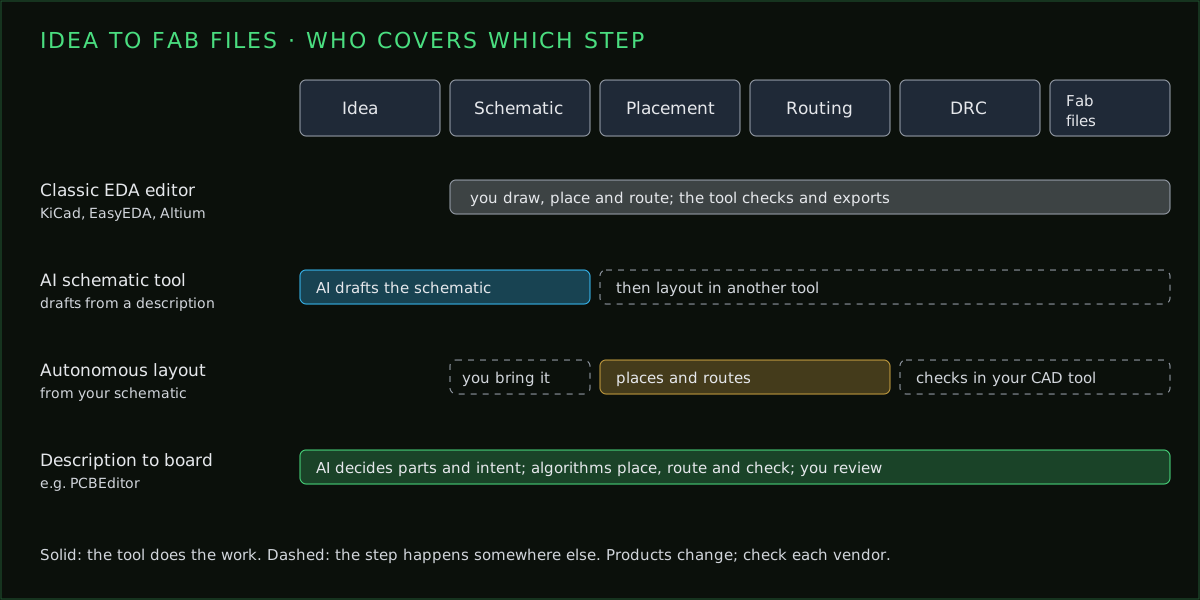
PCBEditor isn’t a fourth option for the same job. It covers the step before these editors: you describe the board in plain English, an AI picks the parts and intent, and deterministic algorithms build the netlist, place, route and check the board. You then export Gerbers, or open the native .kicad_pcb file in KiCad and keep working there. For a side-by-side against each tool, see PCBEditor vs KiCad, vs EasyEDA and vs Altium.
Common questions
- Is KiCad better than EasyEDA?
- For long-term, professional or offline work, KiCad is more capable and fully open source. EasyEDA is easier to start with and its LCSC and JLCPCB integration makes ordering a first board simpler.
- Is KiCad as good as Altium?
- For most two- to six-layer boards, KiCad is capable enough, and recent versions added high-speed tuning and design variants. Altium is still ahead on signal-integrity analysis, managed libraries and team collaboration.
- Is EasyEDA really free?
- Yes. EasyEDA's editors are free to use; the company makes money from the PCB fabrication and component services it connects to.
- Can KiCad open Altium files?
- Yes. KiCad can import Altium Designer projects, and version 10 added importers for Allegro and PADS, though some cleanup after import is normal.
- Which PCB software should a beginner learn?
- EasyEDA gets a first board ordered fastest. KiCad takes longer to learn but is free forever and widely used, so the skill carries further.
Or start one step earlier
Whichever editor you settle on, PCBEditor can produce the first draft: describe the board, get a placed and routed design, and open it in KiCad as a native .kicad_pcb file to keep working.
Generate a first draft→Sources
Checked 7 October 2026 against each vendor's own published material. None of this is our own benchmarking of their products. Prices and plans change; confirm with the vendor.
- KiCad: kicad.org release announcements for version 10.0 (20 March 2026) and 10.0.x updates; licence GPL-3.0.
- EasyEDA: easyeda.com plans and pricing page; EasyEDA Pro documentation comparing the Standard and Pro editions.
- Altium: altium.com product and pricing pages, and Altium documentation.